Bridge Pattern in TypeScript: Real-World Example and Use Cases
- Learning
- TypeScript
- Design Pattern
- Engineering
Table of Contents
- Prerequisites
- Introduction
- What is the Bridge Pattern
- Problem in Booking System
- Solution
- Implementation
- Real Usage
- Pros and Cons
- When not to use it
- Conclusion
- Reference
Prerequisites
- Basic understanding of OOP concepts
- Basic understanding of UML diagrams
- Basic TypeScript knowledge
If you're not familiar with the first two points, this blog might not be suitable for you. Otherwise, you're good to go. The examples are intentionally simple and can be easily replicated in other languages.
Introduction
Hey devs, welcome back to the design pattern series!
In the last post, we covered the Adapter pattern, where we wrapped Stripe and PayPal SDKs behind a single IPaymentProcessor interface so our BookingService never had to know which provider it was talking to. We closed that post with a promise - the next Structural pattern would deal with a different kind of problem, one about rendering a booking as JSON, PDF, or Email.
That's the Bridge pattern, and today we build it.
Where Adapter fixes a compatibility problem between two things that already exist, Bridge is a pattern you reach for at design time, before the incompatibility even shows up, because you already know two things are going to grow independently of each other. That distinction matters, and we'll come back to it later in this post, because it's the single most common point of confusion once you've seen both patterns.
What is the Bridge Pattern
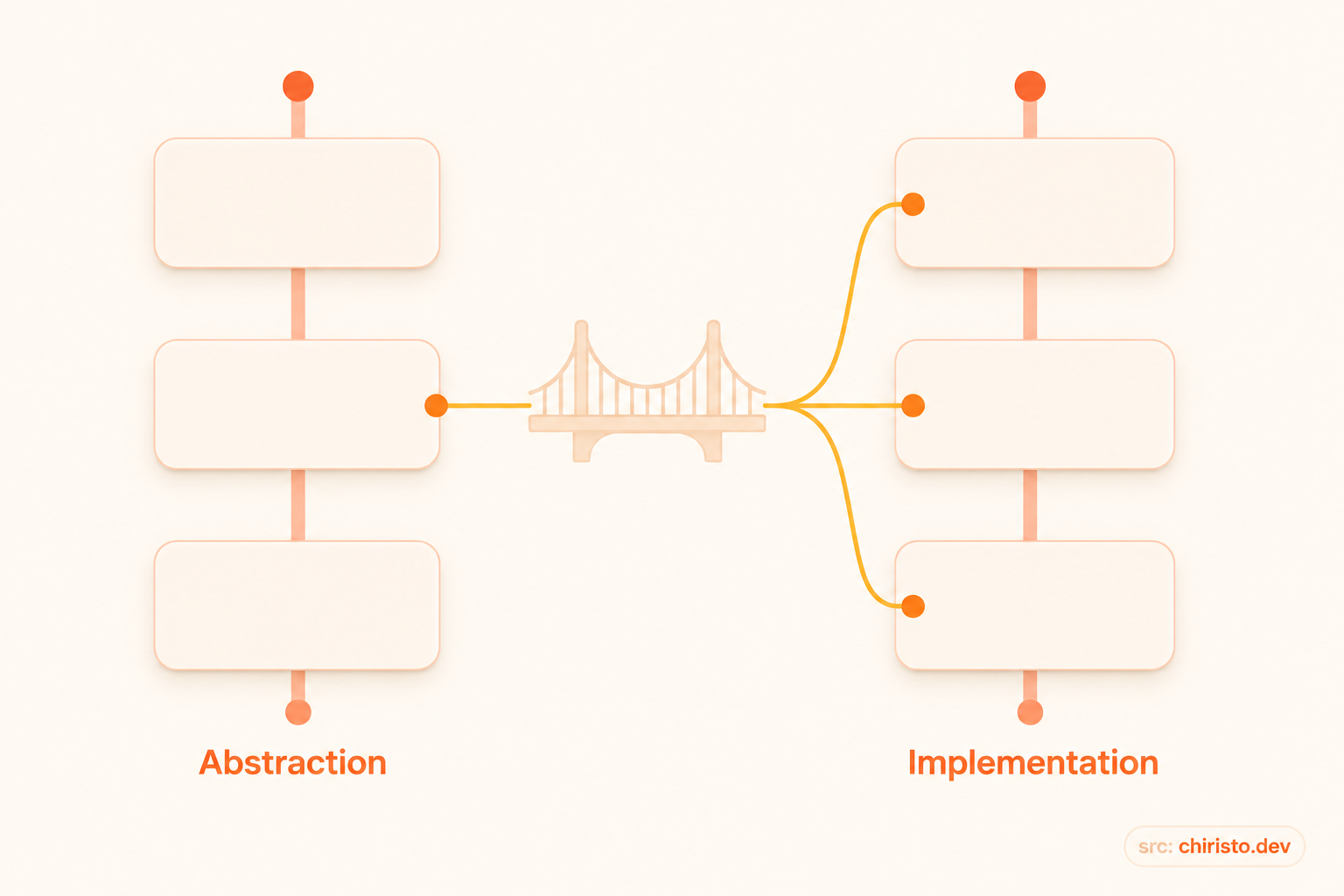
Bridge is a structural design pattern that splits a large class, or a set of closely related classes, into two separate hierarchies - abstraction and implementation - which can be developed independently of each other.
The word "implementation" here doesn't mean the same thing it usually does in programming. In the context of Bridge, the implementation is a second hierarchy of its own, connected to the abstraction through composition rather than inheritance. The abstraction holds a reference to an implementation object and delegates the actual work to it.
Problem in Booking System
A few sprints back, we shipped ConfirmationRenderer and ReceiptRenderer for our Booking System. At the time, Email was the only output channel anyone asked for, so both classes were written straightforwardly - each one built its own HTML string and handed it to the mail service.
class ConfirmationRenderer {
  render(booking: Booking): string {
    return `
      <h1>Booking Confirmed</h1>
      <p>Booking ID: ${booking.id}</p>
      <p>Customer: ${booking.customerName}</p>
      <p>Total Paid: ${booking.currency} ${booking.totalAmount}</p>
    `;
  }
}

class ReceiptRenderer {
  render(booking: Booking): string {
    return `
      <h1>Receipt</h1>
      <ul>
        ${booking.charges.map(c => `<li>${c.label}: ${c.amount}</li>`).join("")}
      </ul>
      <p>Tax: ${booking.taxAmount}</p>
      <p>Total: ${booking.totalAmount}</p>
    `;
  }
}
This worked fine for months. Then two requests landed in the same sprint planning meeting, from two different teams, for two different reasons.
Ops wanted PDF receipts, because enterprise clients need something they can file for expense reports, and HTML-in-email doesn't cut it. Separately, the mobile team wanted JSON confirmations, because the app's push-notification and in-app-booking-summary screens need structured data, not markup they'd have to parse back out of HTML.
Suddenly, "just render it" wasn't one job anymore. It was two questions tangled into one class - what content goes into a confirmation or a receipt, and how that content gets turned into bytes on the wire.
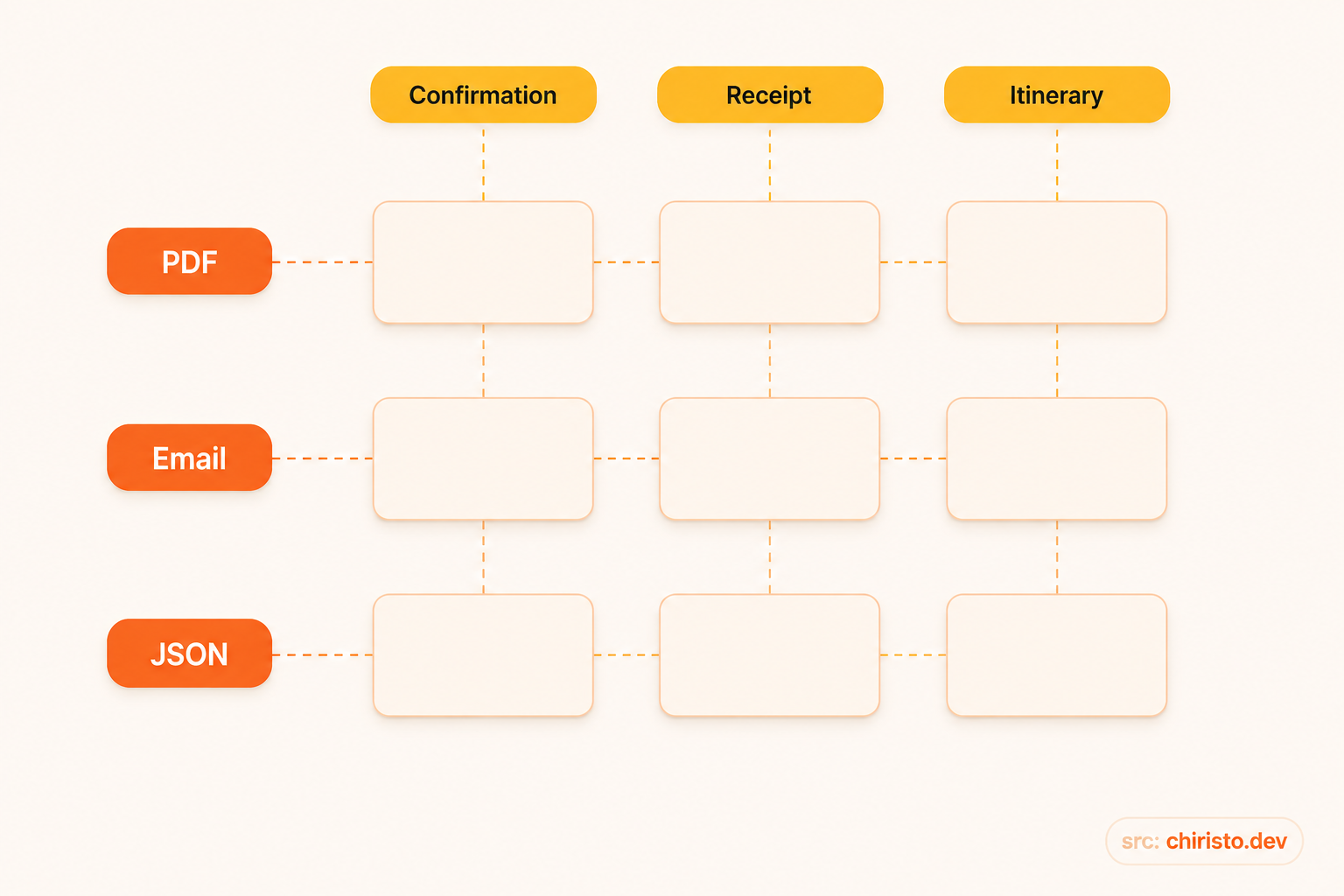
The instinctive fix is to subclass. ConfirmationRendererPdf, ConfirmationRendererEmail, ConfirmationRendererJson, ReceiptRendererPdf, ReceiptRendererEmail, ReceiptRendererJson - and once the itinerary team asks for the same treatment on multi-day holiday packages, add ItineraryRendererPdf, ItineraryRendererEmail, ItineraryRendererJson on top.
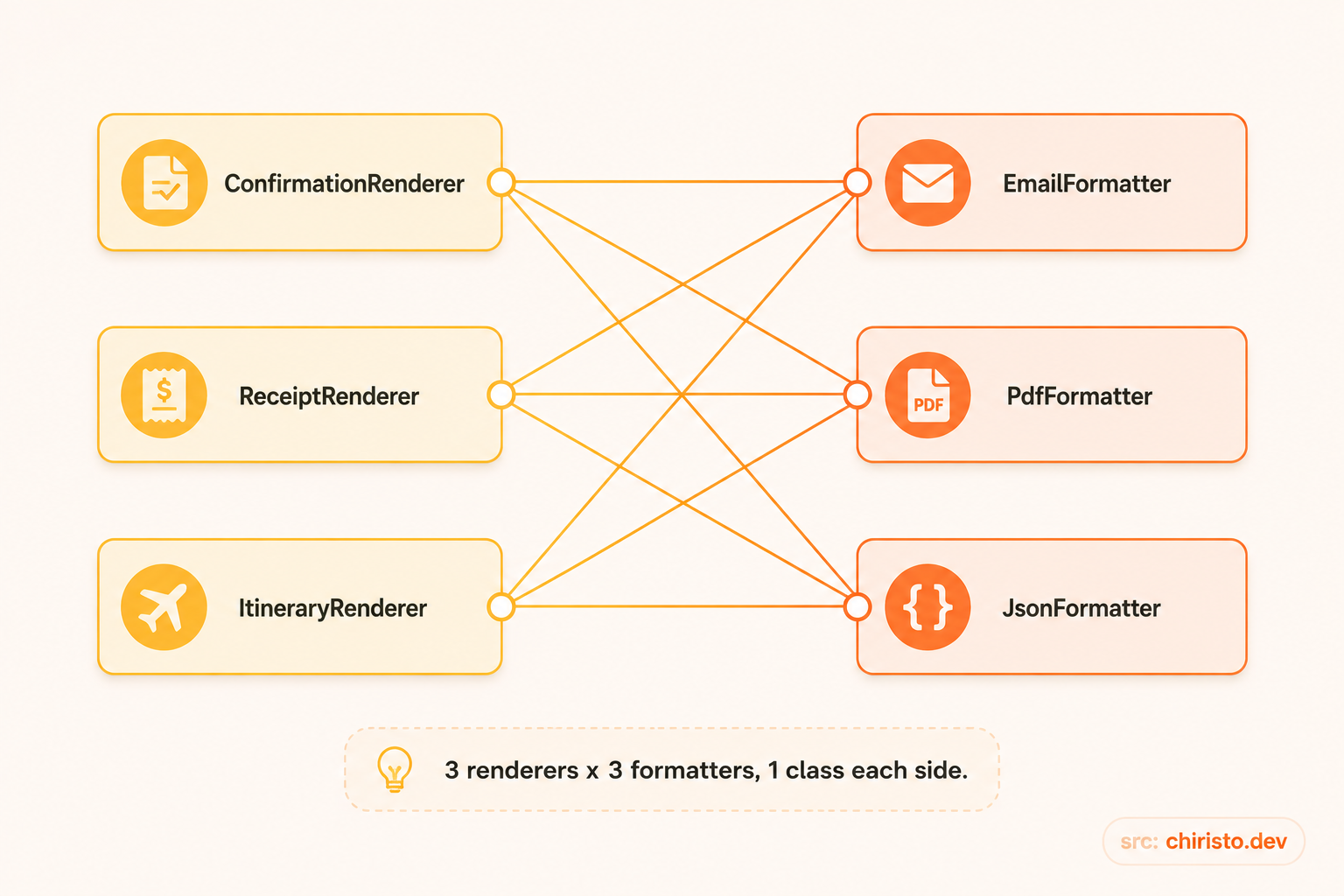
That's three renderer types times three formats - nine classes - to express content that is genuinely only three ideas (confirmation, receipt, itinerary) crossed with three ideas (PDF, Email, JSON). Add a fourth format like SMS next quarter, and you're not adding one class, you're adding three. Add a fourth renderer type, and you're adding three more on the other axis. The growth is multiplicative, not additive, and every single one of those nine classes would duplicate the formatting logic that has nothing to do with what a confirmation or receipt actually contains.
Solution
Bridge asks a simple question here: does the content decision (what sections a confirmation includes, in what order, with what business logic) really need to be coupled to the output decision (how a heading, a key-value pair, or a list gets turned into HTML, PDF markup, or a JSON object)?
It doesn't. Those are two independent responsibilities, so we split them into two hierarchies connected by composition instead of one hierarchy multiplied by inheritance.
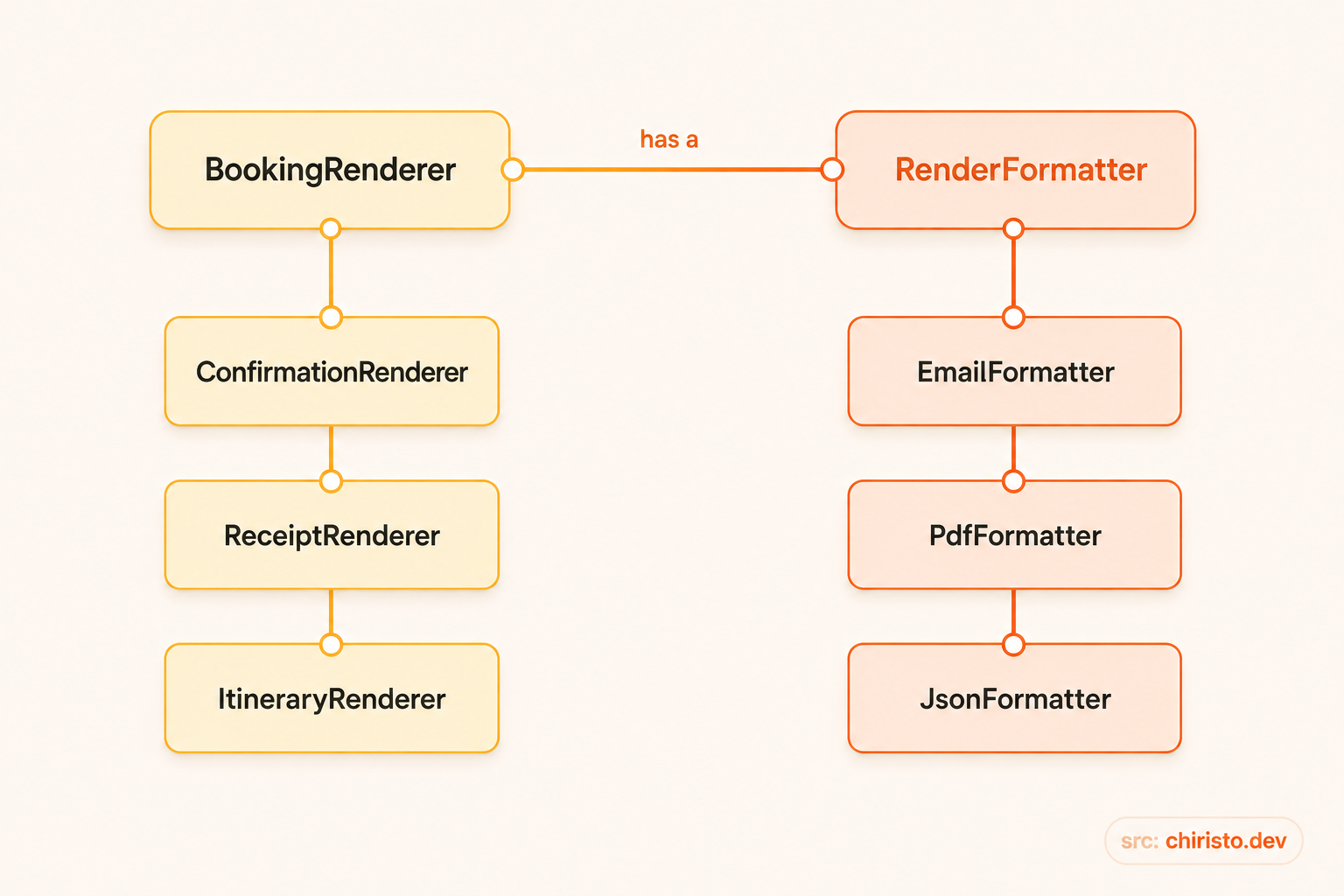
- Abstraction -
BookingRenderer, refined intoConfirmationRenderer,ReceiptRenderer, andItineraryRenderer. Each of these knows what a confirmation, receipt, or itinerary is made of, and in what order the pieces appear. - Implementor -
RenderFormatter, implemented byEmailFormatter,PdfFormatter, andJsonFormatter. Each of these knows how to turn a title, a key-value row, or a list into its specific output format, and nothing about bookings at all.
The abstraction holds a RenderFormatter and delegates every low-level formatting call to it. Any renderer can be paired with any formatter at construction time, or even swapped at runtime, without either hierarchy needing to know the other exists beyond the shared interface.
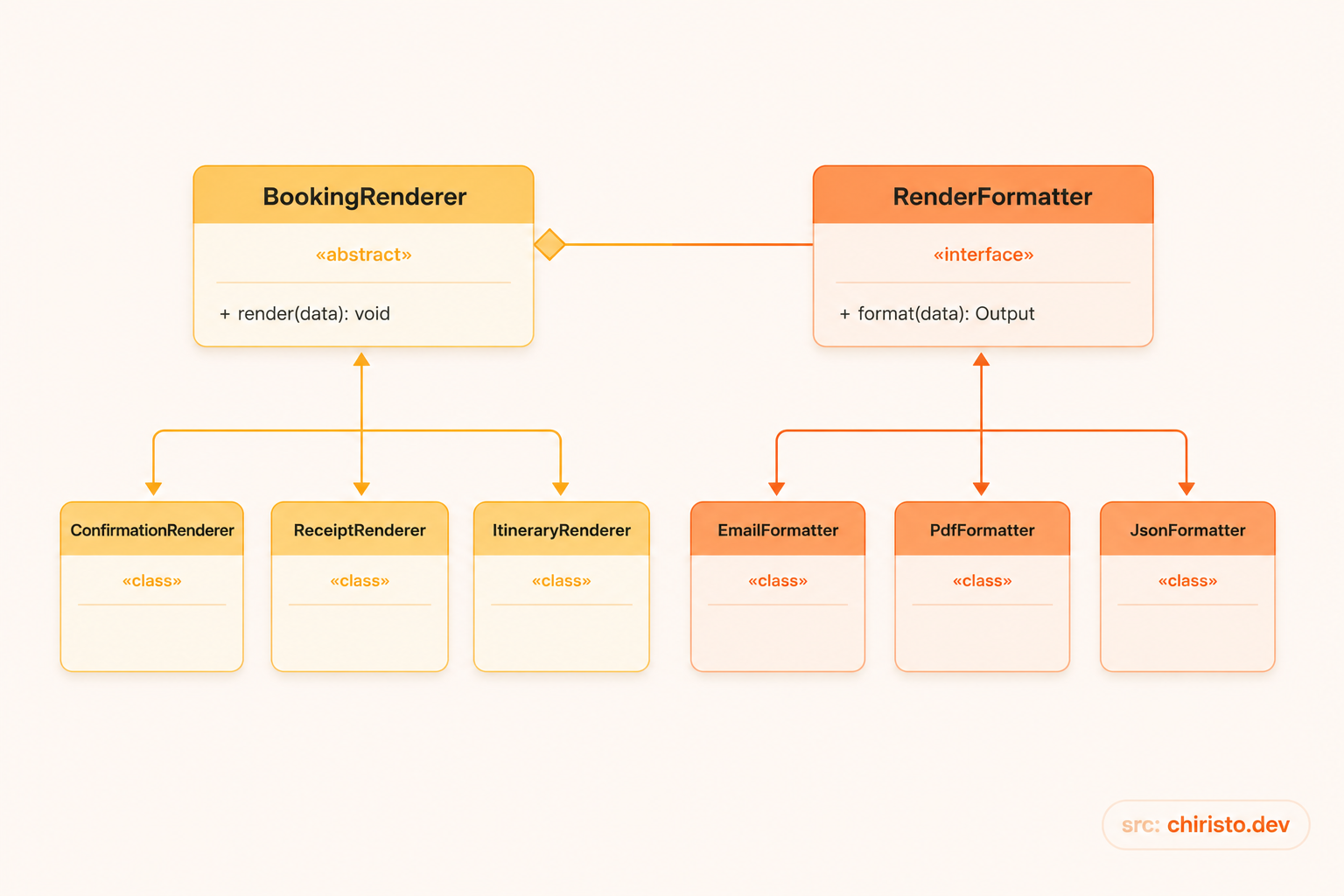
Bridge Pattern - Class Diagram
- Abstraction (
BookingRenderer) - holds a reference to aRenderFormatterand exposes the high-levelrender()method - Refined Abstraction (
ConfirmationRenderer,ReceiptRenderer,ItineraryRenderer) - each defines its own content composition logic on top of the base abstraction - Implementor (
RenderFormatter) - the interface that declares low-level formatting primitives - Concrete Implementor (
EmailFormatter,PdfFormatter,JsonFormatter) - each implements those primitives for a specific output format
Implementation
The Implementor Interface
This is the contract every output format must follow. It only knows about generic building blocks - titles, key-value rows, lists - never about bookings.
interface RenderFormatter {
  renderTitle(title: string): string;
  renderKeyValue(label: string, value: string): string;
  renderList(items: string[]): string;
  wrap(sections: string[]): string;
}
Concrete Implementors
class EmailFormatter implements RenderFormatter {
  renderTitle(title: string): string {
    return `<h1>${title}</h1>`;
  }

  renderKeyValue(label: string, value: string): string {
    return `<p><strong>${label}:</strong> ${value}</p>`;
  }

  renderList(items: string[]): string {
    return `<ul>${items.map(i => `<li>${i}</li>`).join("")}</ul>`;
  }

  wrap(sections: string[]): string {
    return `<div class="email-body">${sections.join("\n")}</div>`;
  }
}

class JsonFormatter implements RenderFormatter {
  renderTitle(title: string): string {
    return JSON.stringify({ type: "title", value: title });
  }

  renderKeyValue(label: string, value: string): string {
    return JSON.stringify({ type: "field", label, value });
  }

  renderList(items: string[]): string {
    return JSON.stringify({ type: "list", items });
  }

  wrap(sections: string[]): string {
    return `{"sections":[${sections.join(",")}]}`;
  }
}

class PdfFormatter implements RenderFormatter {
  renderTitle(title: string): string {
    return `[PDF-TITLE]${title}`;
  }

  renderKeyValue(label: string, value: string): string {
    return `[PDF-ROW]${label}: ${value}`;
  }

  renderList(items: string[]): string {
    return `[PDF-LIST]${items.join(" | ")}`;
  }

  wrap(sections: string[]): string {
    return `[PDF-DOCUMENT]\n${sections.join("\n")}\n[/PDF-DOCUMENT]`;
  }
}
Notice none of these three classes know what a "receipt" or a "confirmation" is. They only know how to render a title, a row, and a list in their own format. That's what keeps this hierarchy genuinely independent from the content hierarchy.
The Abstraction
abstract class BookingRenderer {
  constructor(protected formatter: RenderFormatter) {}

  abstract render(booking: Booking): string;
}
Refined Abstractions
Each refined abstraction owns real content-composition logic - deciding what sections exist and what data goes into them - and delegates only the low-level formatting to whichever RenderFormatter it was given.
class ConfirmationRenderer extends BookingRenderer {
  render(booking: Booking): string {
    const sections = [
      this.formatter.renderTitle("Booking Confirmed"),
      this.formatter.renderKeyValue("Booking ID", booking.id),
      this.formatter.renderKeyValue("Customer", booking.customerName),
      this.formatter.renderKeyValue(
        "Total Paid",
        `${booking.currency} ${booking.totalAmount}`
      ),
    ];
    return this.formatter.wrap(sections);
  }
}

class ReceiptRenderer extends BookingRenderer {
  render(booking: Booking): string {
    const chargeLines = booking.charges.map(
      c => `${c.label}: ${booking.currency} ${c.amount}`
    );

    const sections = [
      this.formatter.renderTitle("Receipt"),
      this.formatter.renderList(chargeLines),
      this.formatter.renderKeyValue("Tax", `${booking.currency} ${booking.taxAmount}`),
      this.formatter.renderKeyValue("Total", `${booking.currency} ${booking.totalAmount}`),
    ];
    return this.formatter.wrap(sections);
  }
}

class ItineraryRenderer extends BookingRenderer {
  render(booking: Booking): string {
    const dayLines = booking.itineraryDays.map(
      (day, index) => `Day ${index + 1}: ${day.summary}`
    );

    const sections = [
      this.formatter.renderTitle("Your Itinerary"),
      this.formatter.renderKeyValue("Booking ID", booking.id),
      this.formatter.renderList(dayLines),
    ];
    return this.formatter.wrap(sections);
  }
}
Each renderer decides what belongs in its output and in what order - that's genuine abstraction-side behavior, not a thin pass-through. The formatter decides how each piece looks on the wire. Neither side needs to change when the other does.
Real Usage
Mixing and matching at construction time
Because BookingRenderer only depends on the RenderFormatter interface, any renderer can be paired with any formatter, and every combination just works.
const emailFormatter = new EmailFormatter();
const pdfFormatter = new PdfFormatter();
const jsonFormatter = new JsonFormatter();

const confirmationForEmail = new ConfirmationRenderer(emailFormatter);
const receiptForPdf = new ReceiptRenderer(pdfFormatter);
const confirmationForMobileApp = new ConfirmationRenderer(jsonFormatter);

console.log(confirmationForEmail.render(booking));
console.log(receiptForPdf.render(booking));
console.log(confirmationForMobileApp.render(booking));
Answering the two requests that started this
The ops team's PDF receipts and the mobile team's JSON confirmations are now both a matter of picking an existing formatter - no new renderer subclass, no touched existing code.
const enterpriseReceipt = new ReceiptRenderer(new PdfFormatter());
const pushNotificationConfirmation = new ConfirmationRenderer(new JsonFormatter());
Adding SMS as a fourth format later means writing one SmsFormatter class that implements RenderFormatter - it automatically becomes usable by ConfirmationRenderer, ReceiptRenderer, and ItineraryRenderer with zero changes to any of them.
Why not Strategy?
This is the question worth asking before committing to Bridge, because the two patterns can look structurally similar in a UML diagram - both involve a class holding a reference to an interface it delegates to.
Strategy exists to swap a single interchangeable algorithm inside one otherwise-stable class - for example, choosing between regular and dynamic demand pricing inside a single PricingCalculator. There's one dimension of variation, and the class holding the strategy typically has little behavior of its own beyond picking and invoking it.
Bridge exists because there are two hierarchies that each carry real, independent behavior, and you need every member of one to be usable with every member of the other. Here, ConfirmationRenderer, ReceiptRenderer, and ItineraryRenderer each make distinct content decisions - they are not interchangeable implementations of the same algorithm, they are different abstractions entirely. If our renderer subclasses did nothing but call formatter.render(booking) with no composition logic of their own, this would have quietly degenerated into Strategy wearing a Bridge costume. The reason it doesn't is that both sides of the split have genuine substance.
Pros and Cons
Pros
- Content logic and output logic can be developed, tested, and changed independently - a designer changing the PDF layout never touches renderer logic, and a renderer change never touches formatting code.
- New formats and new renderer types are additive, not multiplicative. One new class on either side becomes usable with everything already on the other side.
- It avoids the class explosion that comes from trying to express two independent dimensions through a single inheritance hierarchy.
- Formatters and renderers can both be swapped at runtime, which makes it easy to write a
MockFormatterfor unit testing renderer logic in isolation.
Cons
- It introduces two hierarchies and one extra layer of indirection where a single class might have been "good enough" for a smaller problem.
- If, on inspection, one side of the split turns out to have no real behavior of its own, you've paid the structural cost of Bridge for what is actually just Strategy - or worse, for nothing at all.
- Choosing the right split between abstraction and implementor requires you to actually understand which two things vary independently in your domain, and getting that split wrong up front can mean a rework later.
When not to use it
If you only have one output format and no credible plan to add a second, don't introduce a RenderFormatter hierarchy just because it looks more "correct." A single ConfirmationRenderer class that renders straight to HTML is the right amount of code for that problem. Bridge earns its complexity only when you can point to two dimensions that are each expected to grow - if either side is fixed and small, you're paying an abstraction tax for flexibility nobody asked for.
It's also not the right tool when the two things you're separating aren't actually independent - if a PDF receipt needs fundamentally different content than a JSON receipt, forcing them through the same render() composition logic will make the abstraction leak formatter-specific decisions back into the content layer, defeating the entire point of the split.
Conclusion
- Bridge Pattern = decouple an abstraction from its implementation so both can vary independently, connected through composition instead of inheritance
- We split
BookingRendererinto a content hierarchy (ConfirmationRenderer,ReceiptRenderer,ItineraryRenderer) and aRenderFormatterhierarchy (EmailFormatter,PdfFormatter,JsonFormatter), turning a 3x3 subclass explosion into 3 + 3 classes - Adding a new format or a new content type from here on is additive on one side only, with zero changes required on the other
- Bridge is structurally close to Strategy - the difference is that Bridge needs real, independent behavior on both sides of the split, not just one interchangeable algorithm
Ok devs, that's it for today. I tried my best to explain this pattern. In the next post, we'll explore the Composite pattern and see how GroupBooking can treat a collection of individual bookings the same way it treats a single one. If you have any queries or suggestions, please feel free to reach out to me.
Final Mental Model
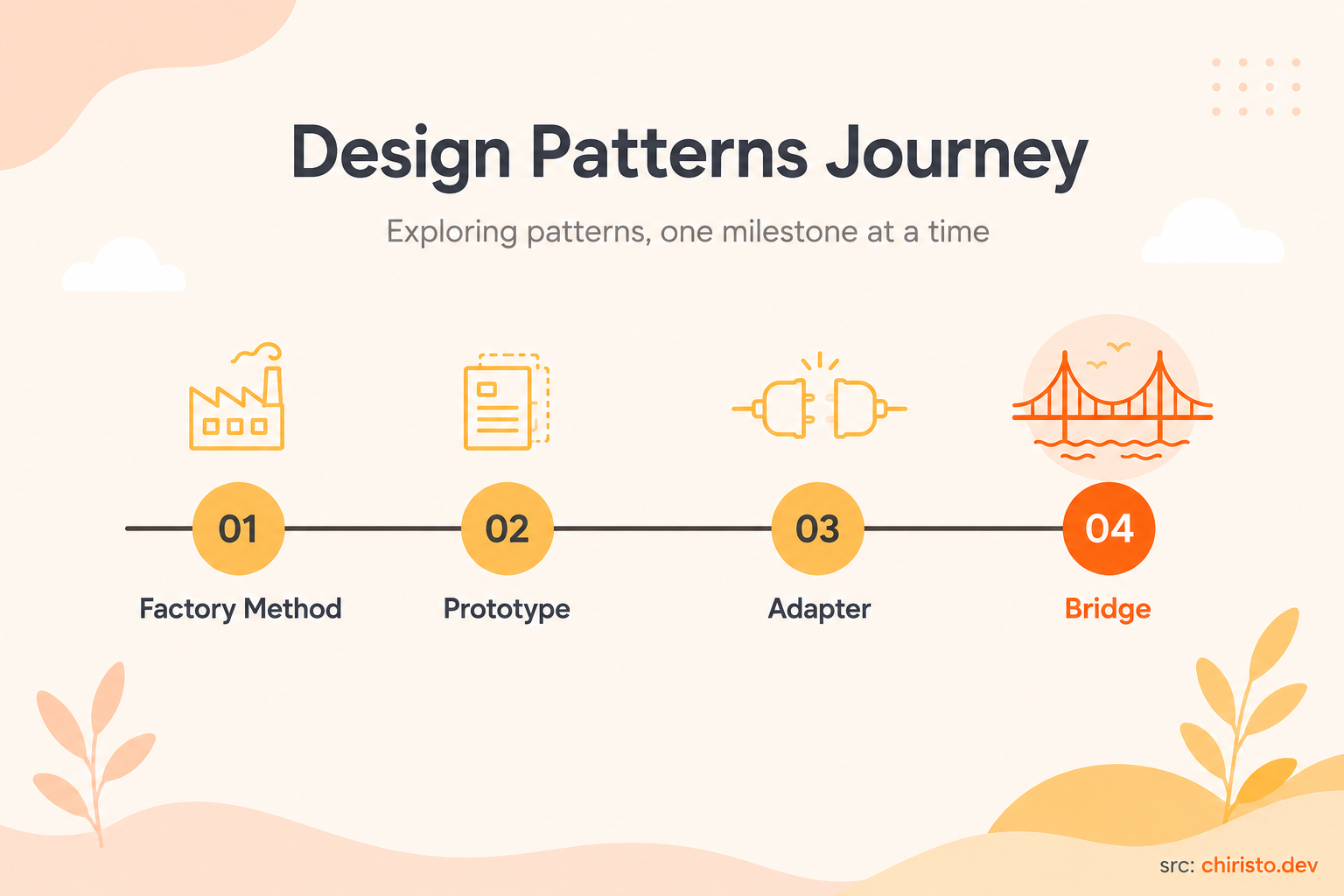
Six patterns down, one more added today. Here's where the Booking System stands:
- Singleton -> one shared instance for global state like
AvailabilityCacheandBookingConfig - Factory Method -> create payment processors by type
- Abstract Factory -> produce a whole family of related objects - Standard, Holiday, or Corporate bookings - together
- Builder -> construct a complex
Bookingstep by step instead of one bloated constructor - Prototype -> reuse existing bookings via cloning, instead of rebuilding recurring ones from scratch
- Adapter -> wrap incompatible third-party SDKs so your system never needs to change
- Bridge -> separate what a booking renders from how it gets formatted, so both can grow on their own
Code, learn, refactor, repeat
Reference
Comments
Enjoyed this one?
Subscribe to get posts like this straight to your inbox - no noise, just quality content.