What Is Caching in System Design? Explained Simply
08 May 2026
- Architecture
- Learning
- Engineering
- Cloud
Last time, we talked about how a load balancer distributes traffic across multiple servers so no single machine gets overwhelmed.
That works well for handling incoming requests. Traffic gets spread out. More users can use the system at the same time. Everything feels scalable from the outside.
But behind the scenes, a different problem quietly starts growing.
What happens when every one of those servers keeps asking the database for the exact same information over and over again?
User profiles. Product details. Application configs. Popular posts. Most of this data barely changes, but the database still has to process the same reads thousands of times every second.
At some point, the database becomes the bottleneck.
And the frustrating part is that adding more servers can actually make the situation worse because now even more machines are repeatedly asking for the same data.
This is exactly the problem caching was designed to solve.
The Receptionist with a Notepad
Picture a busy office reception desk.
People walk up throughout the day asking the same questions again and again.
What's the WiFi password?
Which floor is HR on?
What time does the cafeteria close?
The first time someone asks, the receptionist has to call IT, wait for someone to respond, note the answer down, and then pass it back to the employee standing at the desk.
That process works.
But imagine repeating it hundreds of times every single day for the exact same questions.
Eventually, the receptionist does something smarter. She starts writing the common answers in a notepad beside her desk.
Now when someone asks for the WiFi password again, she doesn't need to make another phone call. The answer is already sitting right in front of her.
The response becomes almost instant.

That notepad is the cache.
The receptionist is your application server. The phone call to IT is the database query.
And suddenly the whole idea of caching feels much less abstract.
But now another problem appears.
What happens if the WiFi password changes, but the receptionist forgets to update the notepad?
The next employee still gets an answer instantly. Unfortunately, it's the wrong answer.

And this is the core trade-off behind caching.
You gain speed, but now you also have to think about freshness and consistency.
We'll come back to that problem shortly because it's where things get genuinely difficult.
So What Is a Cache?
At a technical level, a cache is simply a fast temporary storage layer placed between your application and a slower data source, usually a database.
Instead of asking the database for every request, the application checks whether the answer already exists in cache first.
If the data is already there, the system can return the response immediately without touching the database at all.
This is called a cache hit.
If the data isn't there yet, the system falls back to the database, fetches the data, stores it in cache for future requests, and then returns the response.
This is called a cache miss.
Over time, the most frequently requested data naturally starts living inside the cache because the same requests keep happening repeatedly.
As traffic grows, this dramatically reduces the number of repeated database reads.
And that difference becomes huge at scale.
Without caching, your database spends an enormous amount of time repeating identical work.
With caching, many of those requests get resolved before the database even gets involved.
The idea itself is surprisingly simple, but the performance improvement can be massive once traffic starts increasing.
Where Does the Cache Sit?
Now things get more interesting because there isn't just one way to use a cache.
At the application layer, two common approaches appear most often.
In-Memory Cache (Inside the Server)
The fastest approach is storing cached data directly inside the server's own memory.
Since the data lives on the same machine that's processing the request, there are no additional network calls involved. Access times become incredibly fast, often measured in microseconds.
At first glance, this sounds perfect.
But the moment multiple servers enter the picture, the weaknesses start showing up.
Imagine Server A caches a user's profile.
If the next request gets routed to Server B instead, that server has no idea the cached data already exists somewhere else. It maintains its own completely separate memory.
Now different servers can end up holding different versions of the same data.
Users might even receive inconsistent responses depending on which server handles their request.
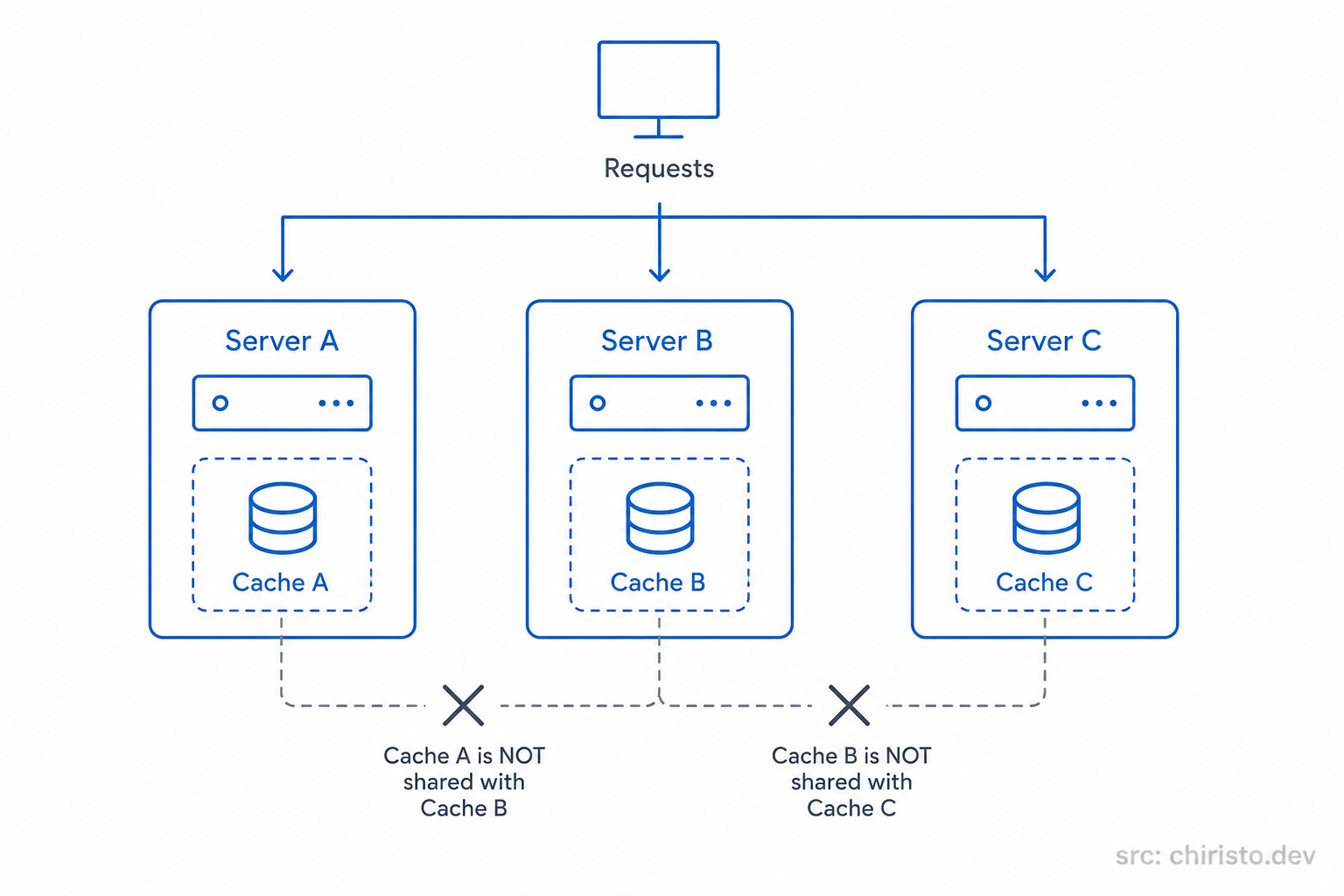
At small scale, this setup works fine.
But in a horizontally scaled system, isolated in-memory caches quickly become difficult to manage consistently.
Distributed Cache (Shared Across Servers)
This is where distributed caching comes in.
Instead of every server maintaining its own private cache, all servers connect to one shared caching system.
Now every machine reads from and writes to the same cache layer.
That means:
- cached data stays consistent across servers
- duplicate work gets reduced significantly
- scaling becomes much easier
Redis is one of the most widely used tools for this.
You can think of Redis as a blazing-fast shared memory system that sits alongside your application infrastructure.
It's external to your servers, but still lives within your internal network, so access remains extremely fast.
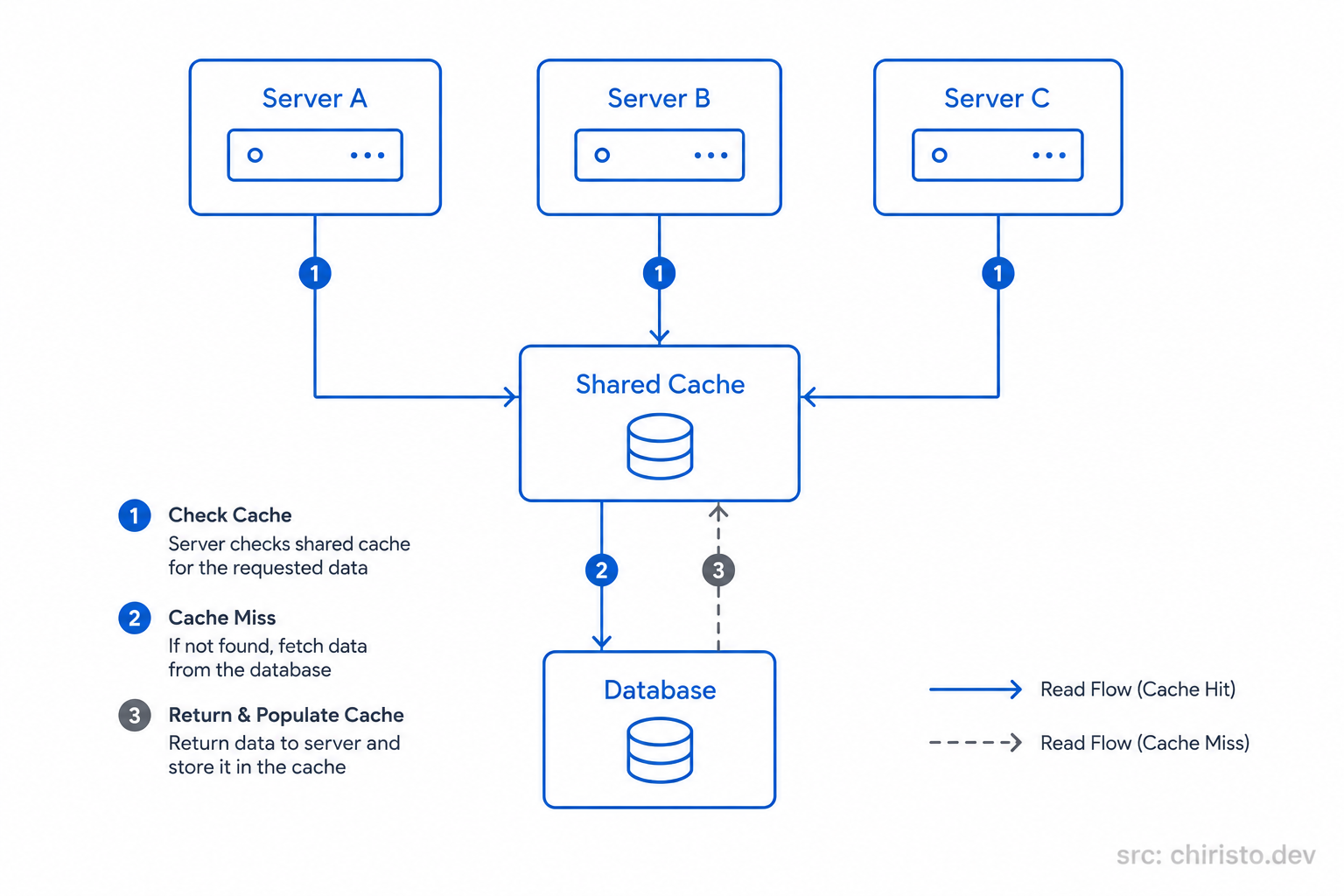
Once systems start scaling horizontally, this shared-cache model becomes the standard approach.
There are other important caching layers too, like browser caching and CDN caching for static assets. We'll properly explore those later when we get to CDNs in this series.
The Hidden Trap: Cache Invalidation
So far, caching sounds almost magical.
Faster responses. Lower database load. Better scalability.
But this is also where one of the hardest problems in system design shows up.
How do you keep the cache synchronized with the real data inside the database?
Imagine a user updates their profile.
The database gets updated immediately, but the cache still contains the older version from a few minutes ago.
Now the system starts confidently serving stale data.
Technically, the application is fast.
But it's also wrong.
This problem is called cache invalidation, and experienced engineers treat it very carefully because there is no perfect universal solution.
In fact, there is a famous joke in computer science:
"There are only two hard things in computing: cache invalidation and naming things."
Funny line. Very real problem.
Because every invalidation strategy introduces trade-offs.
You can optimize for:
- freshness
- consistency
- simplicity
- performance
But improving one often hurts another.
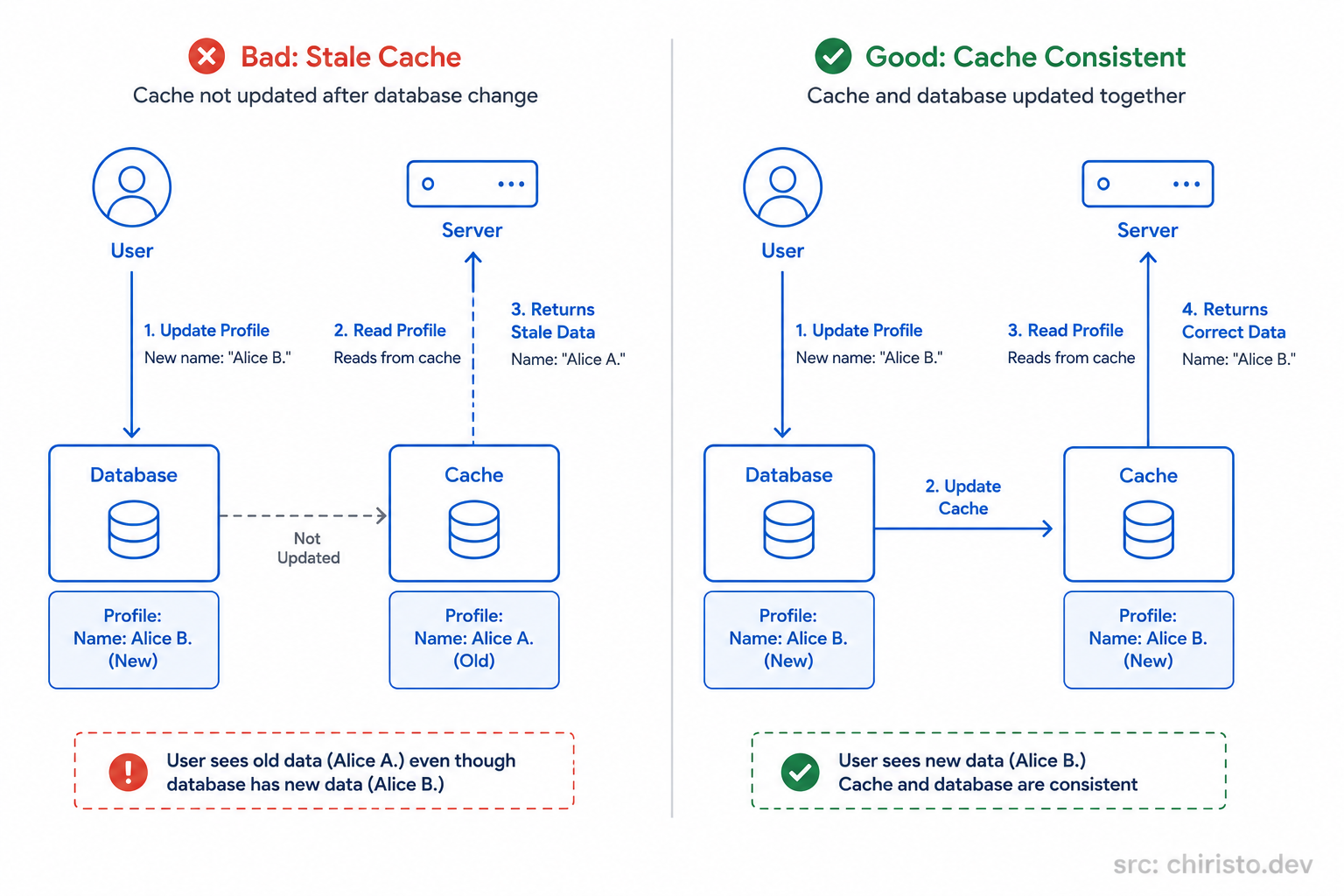
This is why caching is not just a performance feature.
It's also a data consistency challenge.
Strategies like:
- TTL (time to live)
- write-through caching
- write-behind caching
- cache eviction policies
all exist to manage this trade-off in different ways.
Each approach solves certain problems while introducing others.
We'll dive into those strategies properly in a dedicated blog later in the series.
For now, the important thing to understand is this:
Caching makes systems faster. Keeping caches correct is the hard part.
Generic Architecture - No AWS. No GCP. No Azure.
Now let's look at the architecture itself without tying it to any specific cloud provider.
A user request first reaches the application server.
Before touching the database, the server checks whether the requested data already exists in cache.
If the data is found, the response gets returned immediately. The database never gets involved.
That's a cache hit.
If the data doesn't exist in cache yet, the server queries the database, receives the result, stores that result in cache, and then returns it back to the user.
That's a cache miss.
Over time, the most frequently requested data naturally stays available in cache, which significantly reduces database traffic and improves response times across the system.
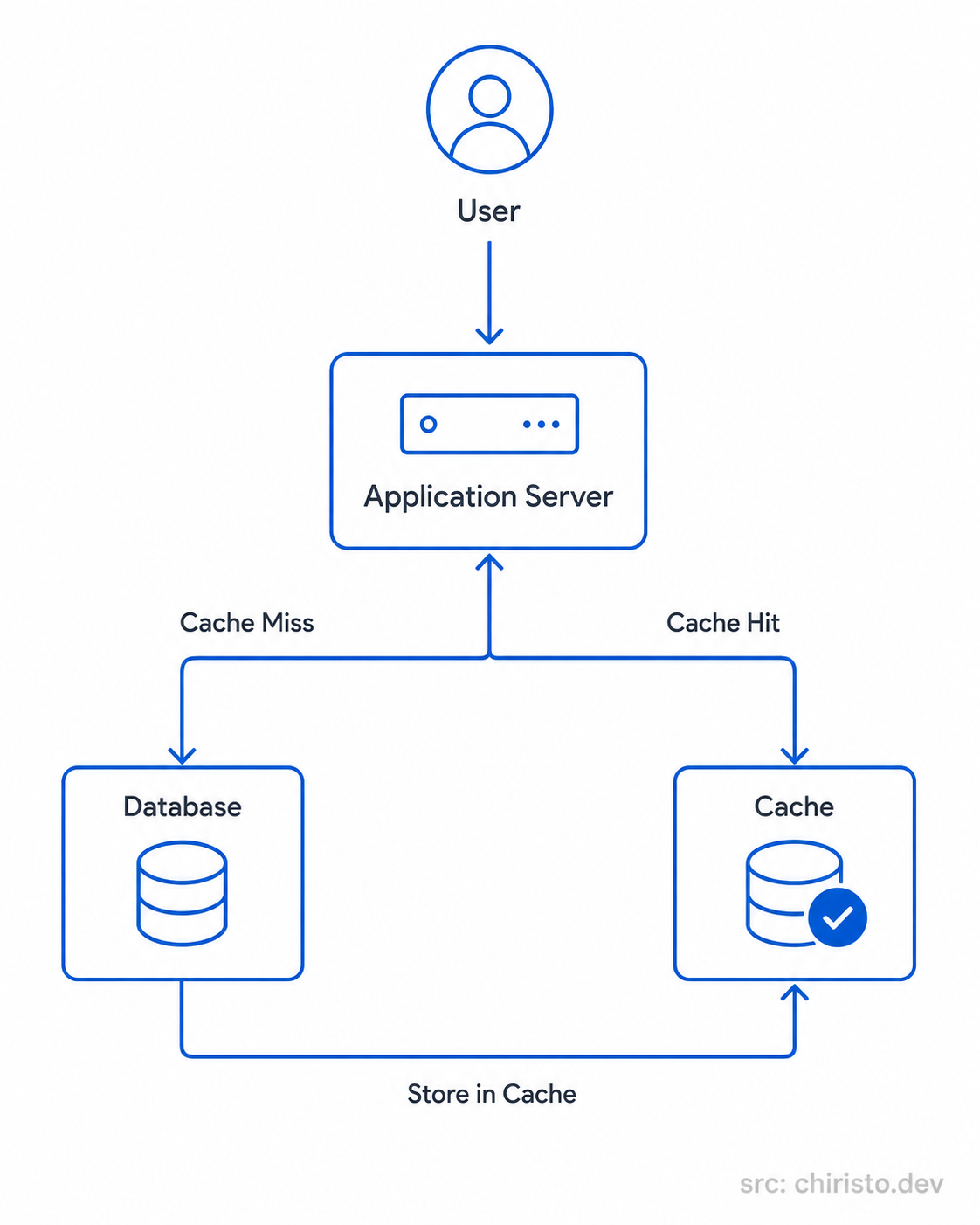
The architecture itself is actually very straightforward.
The difficult part is designing the cache behavior correctly once systems become large and distributed.
How This Looks on AWS, GCP, and Azure
The interesting thing about cloud providers is that the architecture pattern stays almost identical everywhere.
Only the service names change.
| Component | AWS | GCP | Azure |
|---|---|---|---|
| Distributed Cache | ElastiCache (Redis) | Memorystore | Azure Cache for Redis |
| Cache Location | Same VPC as app servers | Same VPC as app servers | Same VNet as app servers |
| Typical Use | Session store, query cache, leaderboards | Session store, query cache | Session store, query cache |
| Underlying Tech | Redis or Memcached | Redis or Memcached | Redis |
Once you understand the architecture pattern itself, cloud diagrams suddenly become much easier to read.
The names differ.
The system design principles don't.
Quick Recap
- A cache is a fast temporary storage layer between your application and the database.
- Cache hits return data immediately without querying the database again.
- Cache misses fetch data from the database and store it for future requests.
- In-memory caches are extremely fast but become difficult to manage across multiple servers.
- Distributed caches solve consistency problems by sharing cached data across the system.
- Cache invalidation is one of the hardest parts of designing reliable caching systems.
- All major cloud providers offer managed Redis-based caching solutions with similar architecture patterns.
What's Next?
At this point, your system can:
- distribute traffic across multiple servers
- avoid hammering the database with repeated reads
- respond much faster under load
But we still haven't talked about the database itself.
It matters a lot.
And most beginners approach that decision from the wrong angle entirely.
That's exactly what we'll explore next in Databases: From System Design Perspective.
See you in the next one.
Stay curious. Build better systems.