Builder Pattern in TypeScript: Real-World Example and Use Cases
- Design Pattern
- Learning
- Tech
- Engineering
Table of Contents
- Prerequisites
- Introduction
- What is Builder Pattern
- Solution
- Basic Implementation
- Pros and Cons
- When not to use it
- Conclusion
- Reference
Prerequisites
- Basic understanding of OOP concepts
- Basic understanding of UML diagrams
- Basic TypeScript knowledge
If you're not familiar with the first two points, this blog might not be suitable for you. Otherwise, you're good to go. The examples are intentionally simple and can be easily replicated in other languages.
Introduction
Hey devs, welcome back to the design pattern series 👋
In the previous post, we explored the Abstract Factory pattern, where we defined booking families such as Standard, Holiday, and Corporate bookings. Each family encapsulates business rules like pricing strategies, discount policies, and benefits.
In this post, we move one level deeper.
Once a booking family is chosen, we still need to construct an actual booking such as a Room, Cab, Flight, or Movie booking. This is where the Builder pattern fits naturally.
What is Builder Pattern
Builder Pattern
Builder is a creational design pattern that constructs complex objects step by step. It allows you to create different representations of an object using the same construction process.
Instead of forcing all configuration into a large constructor, Builder separates how an object is built from what the object represents.
The Problem
In our booking system, a booking is not a simple object. A Room booking, for example, can have:
Required parameters
- Customer details
- Room information
- Stay duration
Optional parameters
- Add-ons (breakfast, spa, parking)
- Insurance
- Promotional codes
- Special requests
- Payment method
- Notification preferences and more
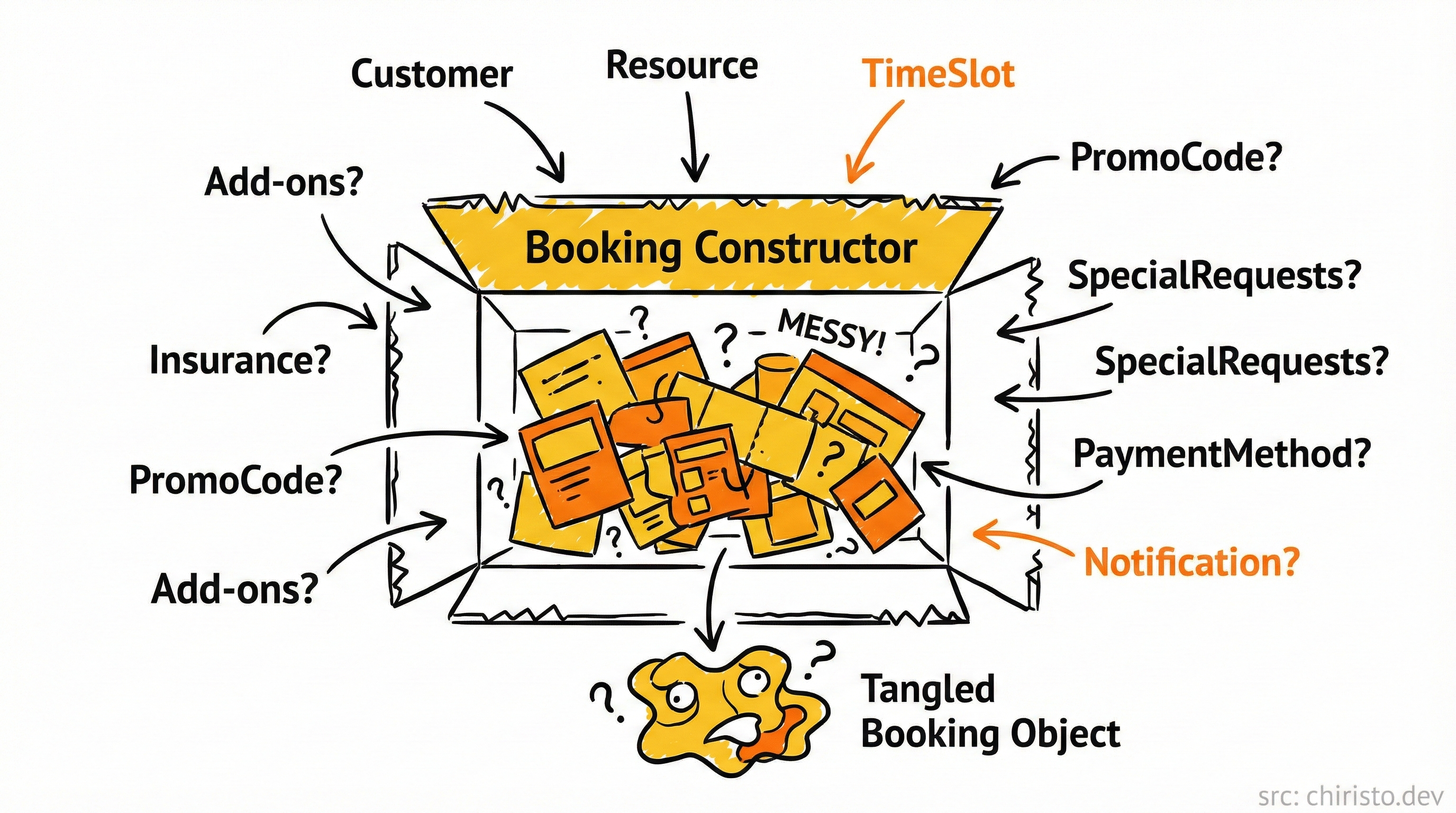
If we rely on constructors alone, we quickly run into the below problems:
- Complex constructor with many parameters, some of which might be optional
- Telescoping constructors (multiple constructors with different parameter combinations)
- Hard to read and maintain code when creating objects with many configuration options
- Passing
undefinedfor optional values
Let's look at what happens without a proper pattern:
class RoomBooking {
  constructor(
    public customer: Customer,
    public room: Room,
    public stay: TimeSlot,
    public addOns?: string[],
    public insurance?: Insurance,
    public promoCode?: string,
    public specialRequests?: string,
    public paymentMethod?: PaymentMethod,
    public notificationPreference?: NotificationPreference
  ) {}
}

const booking = new RoomBooking(
  customer,
  room,
  stay,
  undefined,
  undefined,
  "SUMMER25"
);
The constructor becomes heavy as we add more optional parameters. The client code gets messy with undefined values, and it's hard to tell what each parameter means without looking at the constructor definition.
Initial Implementation
You might try to solve this with method overloading or default parameters, but that approach has limits
// Using method overloading
class Booking {
	// method signatures
  constructor(customer: Customer, resource: Resource, timeSlot: TimeSlot);
  constructor(customer: Customer, resource: Resource, timeSlot: TimeSlot, addOs?: string[]);
  constructor(customer: Customer, resource: Resource, timeSlot: TimeSlot, addOs?: string[], insurance?: Insurance);
  // And so on...
  constructor(customer: Customer, resource: Resource, timeSlot: TimeSlot, addOns?: string[], insurance?: Insurance, /* more params */) {
    // Implementation
  }
}

// Using default parameters
class Booking {
  constructor(
    public customer: Customer,
    public resource: Resource,
    public timeSlot: TimeSlot,
    public addOns: string[] = [],
    public insurance?: Insurance,
    public promoCode: string = ""
    // And so on...
  ) {}
}
These approaches don't scale well with many optional parameters and don't provide good readability when instantiating those objects.
Solution
The Builder pattern says
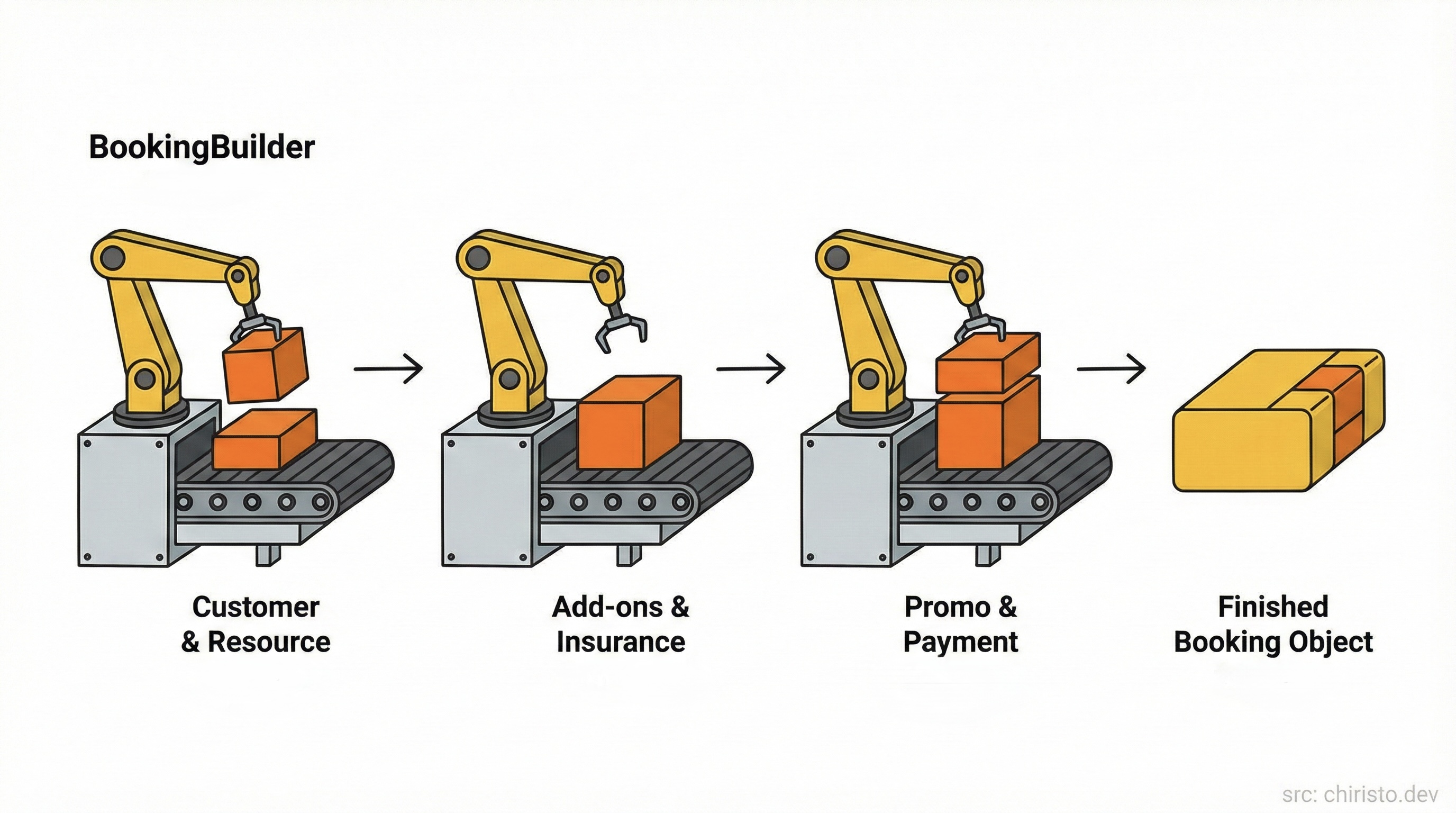
Extract the object construction code out of its own class and move it to separate objects called builders.
In our Booking System, we can apply this pattern by
- Creating a
BookingBuilderclass dedicated to constructingBookingobjects - Providing methods for setting each optional parameter
- Having a final
build()method that constructs and returns the complete object
How this can fit with our existing structure of Abstract Factory
- Abstract Factory selects the booking family (Standard, Holiday, Corporate)
- Builder Pattern constructs a specific booking type (Room, Cab, Flight, Movie)
These two patterns solve different problems and work together without overlap.
Booking Builder Pattern
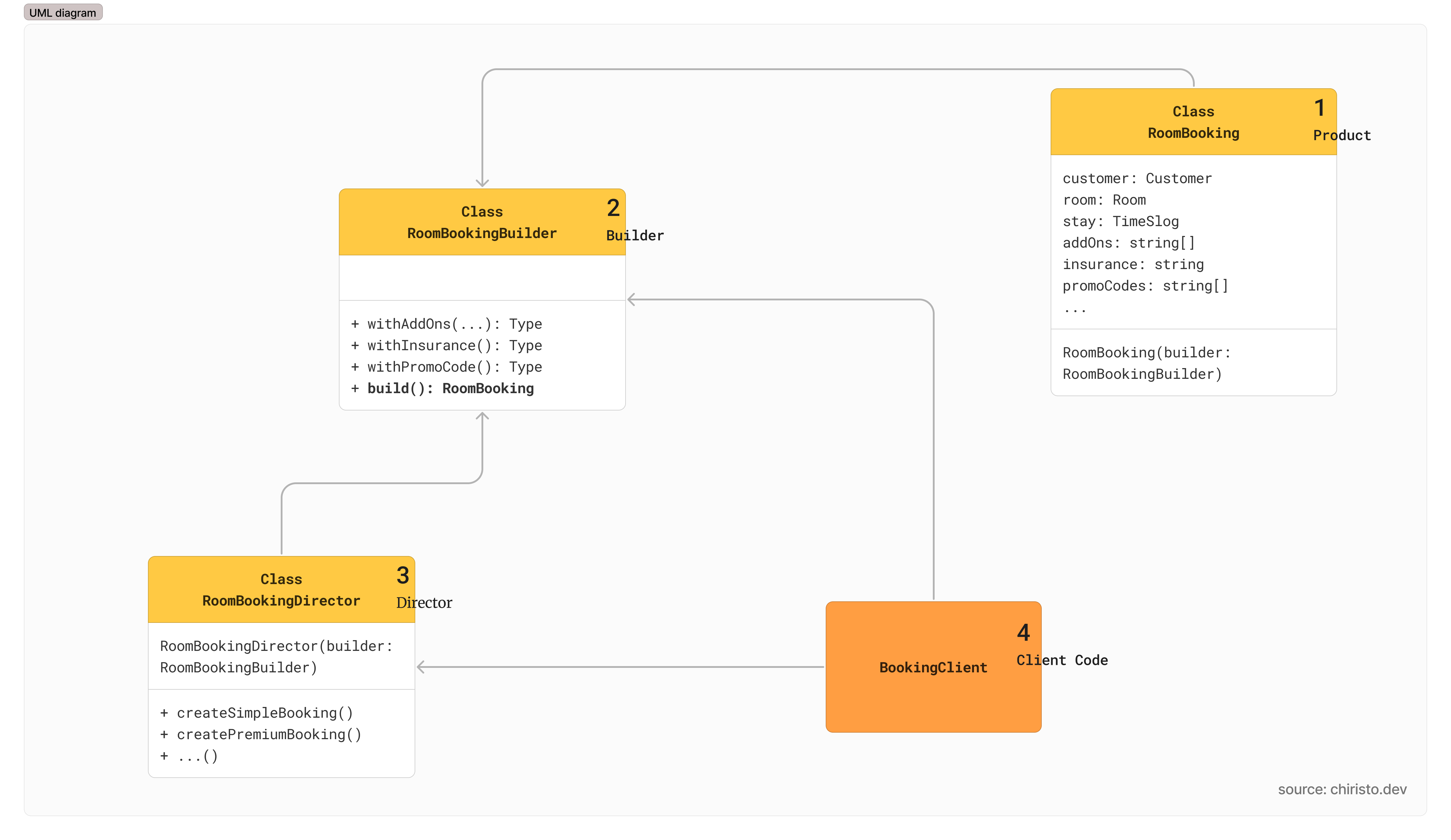
Solution steps
- Define the product class (
RoomBooking)- Represents a concrete booking type
- Contains all required and optional parameters
- Does not expose a complex constructor directly it depends fully on the builder
- Create a Builder interface (optional)
- Declares the construction steps required to build a generic
Bookingobject - Ensures all concrete builders (RoomBooking, CabBooking, MovieBooking) follow the same construction contract
- In our example it is not needed
- Declares the construction steps required to build a generic
- Implement concrete builders
RoomBookingBuilderprovides implementations for each construction step- Handles optional configurations such as add-ons, insurance, promo codes, and payment details
- Includes a
build()method that returns a fully constructedRoomBookinginstance
- Create a Director class (optional)
- Defines the order in which construction steps are executed
- Can be used to create predefined booking configurations (for example, basic booking or premium booking)
Note: In our system, the booking family (Standard, Holiday, Corporate) is selected earlier using the Abstract Factory pattern.
The Builder pattern shown here focuses purely on constructing a specific booking type (Room booking) step by step.
Builder Pattern Diagram
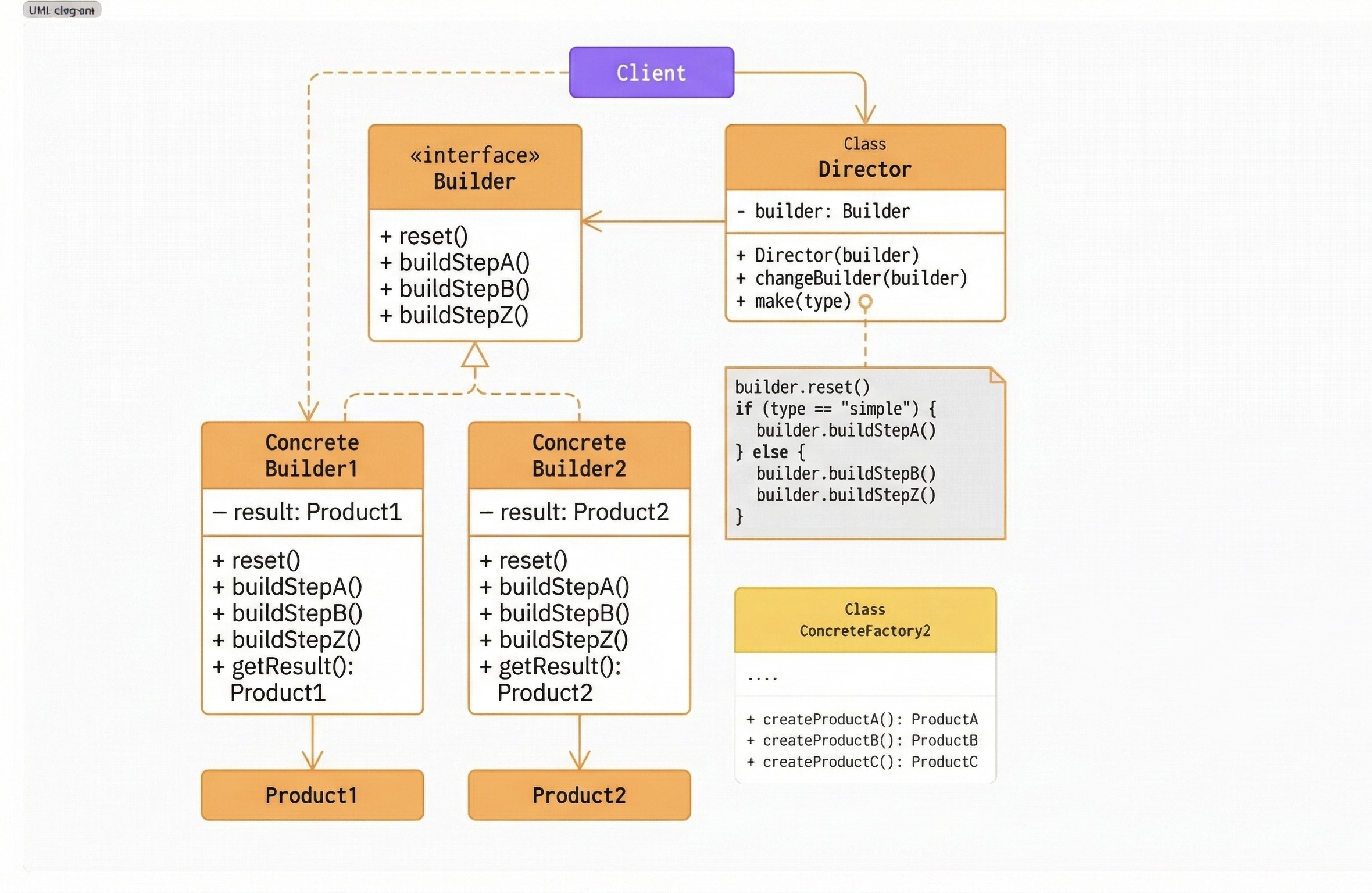
- Builder interface defines the step-by-step construction process (
reset,buildStepA,buildStepB,buildStepZ) without knowing the final product details. This ensures the construction algorithm is independent of concrete implementations. - Concrete Builders implement the Builder interface and maintain their own internal product (
Product1,Product2). Each builder decides how the construction steps are applied and exposes agetResult()method to return the final object. - Director controls the order of construction steps by working only with the Builder interface. It can create different product variants (simple, complex, etc.) using the same builder by changing the sequence of steps.
- Client is responsible for choosing the concrete builder and optionally using the Director. The client never directly constructs the product; it only retrieves the final result from the builder.
You might be confusing the two class diagrams. They are not meant to be identical. Both diagrams are only intended to provide a high-level, class-level understanding of the pattern. The actual implementation will always vary based on the specific requirements and use case.
Basic Implementation
// Product: RoomBooking
class RoomBooking {
  public customer: Customer;
  public room: Room;
  public stay: TimeSlot;

  public addOns: string[];
  public insurance?: Insurance;
  public promoCode?: string;
  public specialRequests?: string;
  public paymentMethod?: PaymentMethod;
  public notificationPreference?: NotificationPreference;

  constructor(builder: RoomBookingBuilder) {
    this.customer = builder.customer;
    this.room = builder.room;
    this.stay = builder.stay;
    this.addOns = builder.addOns;
    this.insurance = builder.insurance;
    this.promoCode = builder.promoCode;
    this.specialRequests = builder.specialRequests;
    this.paymentMethod = builder.paymentMethod;
    this.notificationPreference = builder.notificationPreference;
  }
}
The RoomBooking class does not expose a complex constructor. Instead, it relies on the Builder to provide a valid and complete instance.
class RoomBookingBuilder {
  // Required
  public customer: Customer;
  public room: Room;
  public stay: TimeSlot;

  // Optional
  public addOns: string[] = [];
  public insurance?: Insurance;
  public promoCode?: string;
  public specialRequests?: string;
  public paymentMethod?: PaymentMethod;
  public notificationPreference?: NotificationPreference;

  constructor(customer: Customer, room: Room, stay: TimeSlot) {
    this.customer = customer;
    this.room = room;
    this.stay = stay;
  }

  withAddOns(addOns: string[]): this {
    this.addOns = addOns;
    return this;
  }

  withInsurance(insurance: Insurance): this {
    this.insurance = insurance;
    return this;
  }

  withPromoCode(code: string): this {
    this.promoCode = code;
    return this;
  }

  withSpecialRequests(requests: string): this {
    this.specialRequests = requests;
    return this;
  }

  withPaymentMethod(method: PaymentMethod): this {
    this.paymentMethod = method;
    return this;
  }

  withNotificationPreference(pref: NotificationPreference): this {
    this.notificationPreference = pref;
    return this;
  }

  build(): RoomBooking {
    // Validation before construction
    if (this.addOns.length > 0 && !this.paymentMethod) {
      throw new Error("Payment method is required when add-ons are selected");
    }

    return new RoomBooking(this);
  }
}
This builder:
- Makes object creation readable
- Enforces construction rules
- Prevents partially valid bookings
The Director is optional and represents predefined booking flows.
// Director class (optional)
class RoomBookingDirector {
  createBasicBooking(builder: RoomBookingBuilder): RoomBooking {
    return builder.build();
  }

  createPremiumBooking(builder: RoomBookingBuilder): RoomBooking {
    return builder
      .withAddOns(["breakfast", "spa", "airport transfer"])
      .withInsurance(new PremiumInsurance())
      .withPaymentMethod(new CreditCardPayment())
      .build();
  }

   createPromotionalBooking(builder: BookingBuilder, promoCode: string): RoomBooking {
    return builder
      .withPromoCode(promoCode)
      .build();
  }
}
In many modern systems, this orchestration logic lives in a service layer instead of a dedicated Director class.
Finally the client code
// Client code
function main() {
  const customer = new Customer("John Doe");
  const room = new Room("Deluxe Suite");
  const stay = new TimeSlot(new Date(), 3); // 3-day stay

  // Using the builder directly
  const booking1 = new RoomBookingBuilder(customer, room, stay)
    .withPromoCode("SUMMER25")
    .withSpecialRequests("Room with ocean view")
    .withPaymentMethod(...)
    .build();

  // Using the director for common configurations
  const director = new BookingDirector();
  const builder = new BookingBuilder(customer, room, timeSlot);

  const simpleBooking = director.createSimpleBooking(builder);
  const premiumBooking = director.createPremiumBooking(
    new BookingBuilder(customer, room, timeSlot)
  );
  const promoBooking = director.createPromotionalBooking(
    new BookingBuilder(customer, room, timeSlot),
    "FLASH50"
  );
}

main();
The code is now much more readable, maintainable, and expressive. You can see clearly what parameters are being set and what they represent.
Pros and Cons
Pros
- You can construct objects step-by-step, defer construction steps, or run steps recursively
- You can reuse the same construction code for different product representations
- Single Responsibility Principle: isolates complex construction code from the business logic
- Creates a fluent, more readable API for object creation
- Can enforce validation rules during the build process
Cons
- Introduces additional classes and code complexity
- May be overkill for simpler objects with few optional parameters
- The pattern requires creating a new builder for each different product type
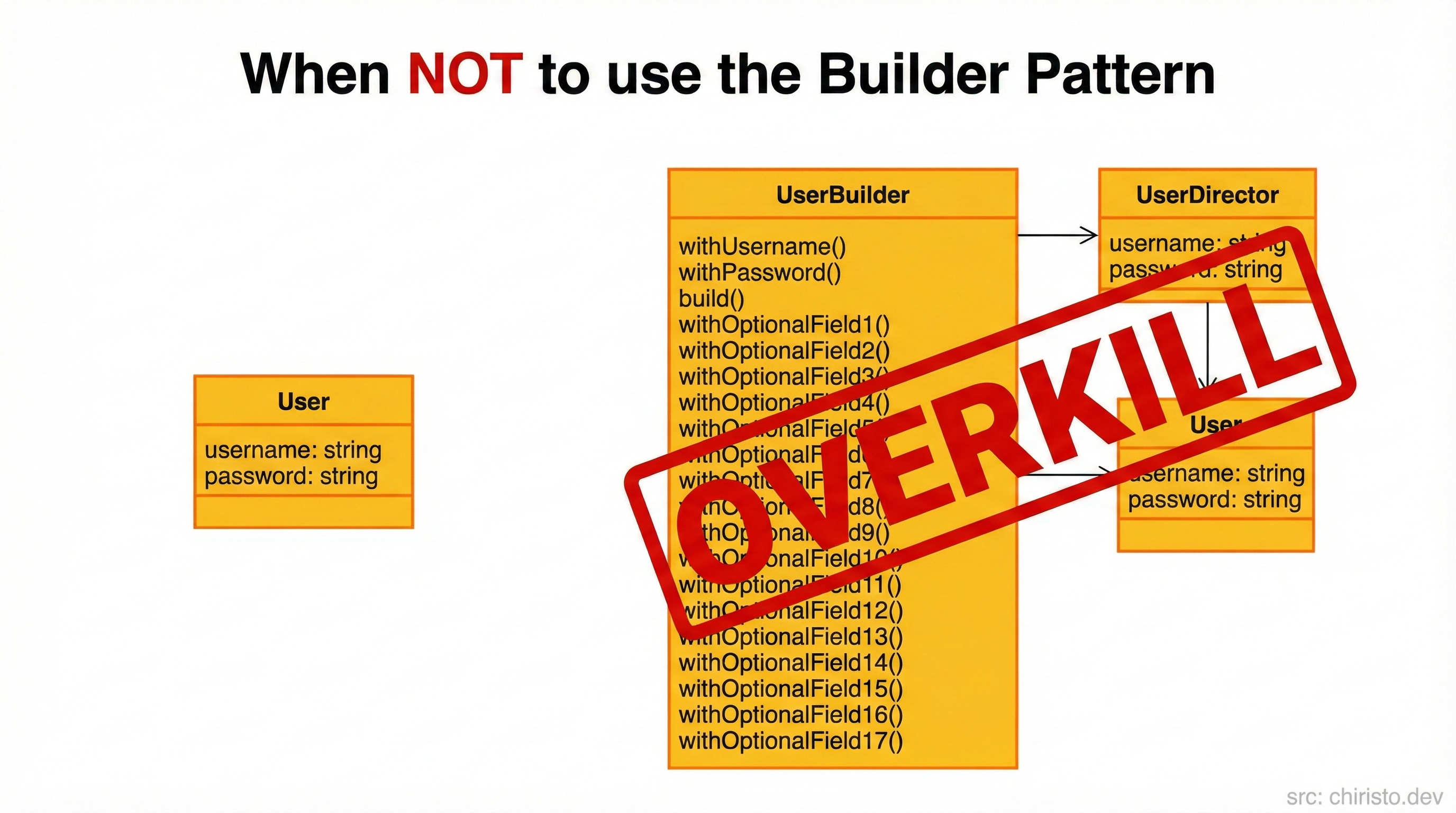
When not to use it
- For simple objects with few parameters, a Builder might add unnecessary complexity
- When all parameters are required, a constructor is simpler
- If your object configuration doesn't change frequently, consider using factory methods instead
And remember... the Builder pattern is great for complex objects, but don't overuse it!
Conclusion
- Builder Pattern = step-by-step construction of complex objects
- Perfect for creating objects with many optional parameters
- We saw how
RoomBookingBuilderhelps create customizable bookings with add-ons, insurance, and promo codes in a clean, readable way - Abstract Factory selects the booking family (Booking, Invoice and Template) and Builder Pattern constructs a specific booking type
Ok devs, that's it for today. I tried my best to explain this pattern. In the next post, we'll explore another pattern in our Design Pattern series. If you have any queries or suggestions, please feel free to reach out to me.
Code, learn, refactor, repeat
Reference
Comments
Enjoyed this one?
Subscribe to get posts like this straight to your inbox - no noise, just quality content.